
Introduction
Imagine if every repetitive task in your business happened automatically.
A customer submits a form on your website, and within seconds their information appears in your CRM, a welcome email is sent, your sales team receives a Slack notification, and a follow-up task is created—all without anyone lifting a finger.
This isn't the future. It's what thousands of businesses already do every day with Zapier.
Whether you're a small business owner, marketer, eCommerce brand, agency, or enterprise team, automation has become one of the biggest competitive advantages. Instead of spending hours on repetitive tasks, businesses are using workflow automation to save time, reduce errors, and focus on work that actually grows revenue.
In this guide, you'll learn:
- What Zapier is
- How Zapier works
- Key features and terminology
- Real-world business use cases
- Advantages and limitations
- Whether Zapier is right for your business in 2026
By the end of this guide, you'll understand why more than millions of professionals worldwide rely on Zapier to automate their daily workflows and connect thousands of business applications.
What is Zapier?
Zapier is a no-code workflow automation platform that connects different apps and services, allowing them to automatically exchange information and perform tasks without manual intervention.
Instead of copying data between applications, Zapier does the work for you.
Think of Zapier as a digital employee working 24 hours a day.
Whenever something happens in one application, Zapier instantly performs actions in another application.
For example:
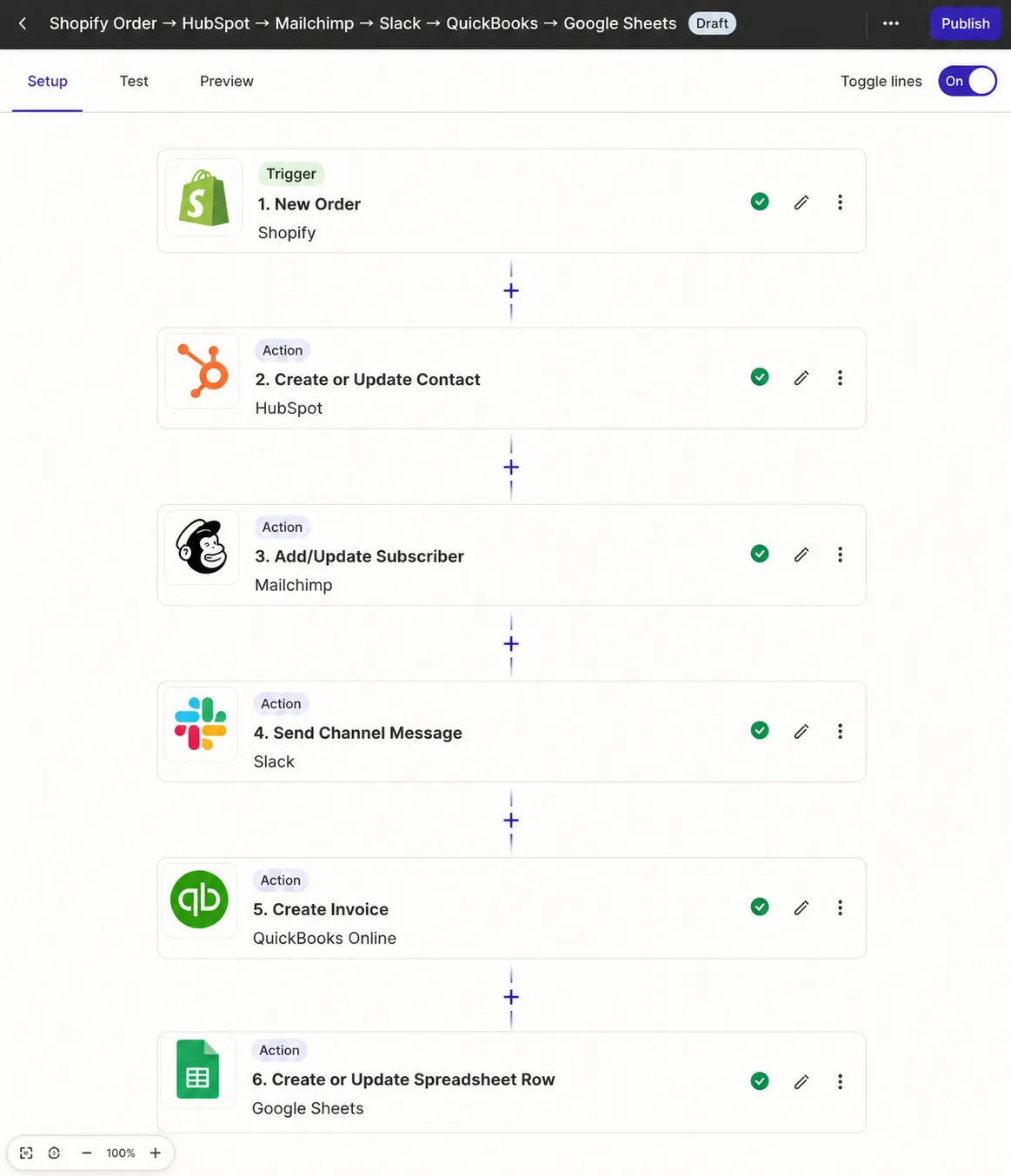
A customer places an order in Shopify.
↓
Zapier automatically creates the customer inside HubSpot.
↓
Adds them to Mailchimp.
↓
Sends a Slack notification.
↓
Creates an invoice in QuickBooks.
↓
Updates Google Sheets.
Everything happens automatically.
No coding.
No manual work.
No mistakes.
This is why Zapier has become one of the world's most trusted automation platforms for businesses of all sizes.
Why Businesses Need Automation in 2026
Businesses today use dozens of software applications.
A typical company might use:
- CRM
- Email marketing
- Accounting software
- Project management
- Team communication
- Calendar
- Online forms
- Social media scheduling
- Payment gateways
- Customer support software
The problem?
These tools don't always communicate with each other.
Employees end up spending hours every week copying information between systems.
Common repetitive tasks include:
- Copying leads into a CRM
- Sending confirmation emails
- Updating spreadsheets
- Creating invoices
- Assigning tasks
- Scheduling meetings
- Sending notifications
- Creating support tickets
Even spending just 15 minutes on each task several times a day adds up to hundreds of hours every year.
Zapier eliminates these repetitive processes by connecting your applications and automating the workflow.
The result is:
- Faster operations
- Improved customer experience
- Fewer human errors
- Increased productivity
- Lower operational costs
How Does Zapier Work?
Zapier works using automated workflows called Zaps.
A Zap consists of two main parts:
1. Trigger
A trigger is the event that starts the automation.
Examples include:
- New Shopify order
- New Google Form submission
- New Gmail email
- Stripe payment received
- New Facebook Lead
- New Calendly booking
Think of the trigger as the starting point.
2. Action
An action is what Zapier does after the trigger occurs.
Examples include:
- Create CRM contact
- Send an email
- Update Google Sheets
- Send Slack message
- Create Trello task
- Generate invoice
- Add customer to Mailchimp
- Create Notion page
One trigger can perform multiple actions automatically.
Example Workflow
Imagine you're running a digital marketing agency.
When someone fills out your website's contact form:
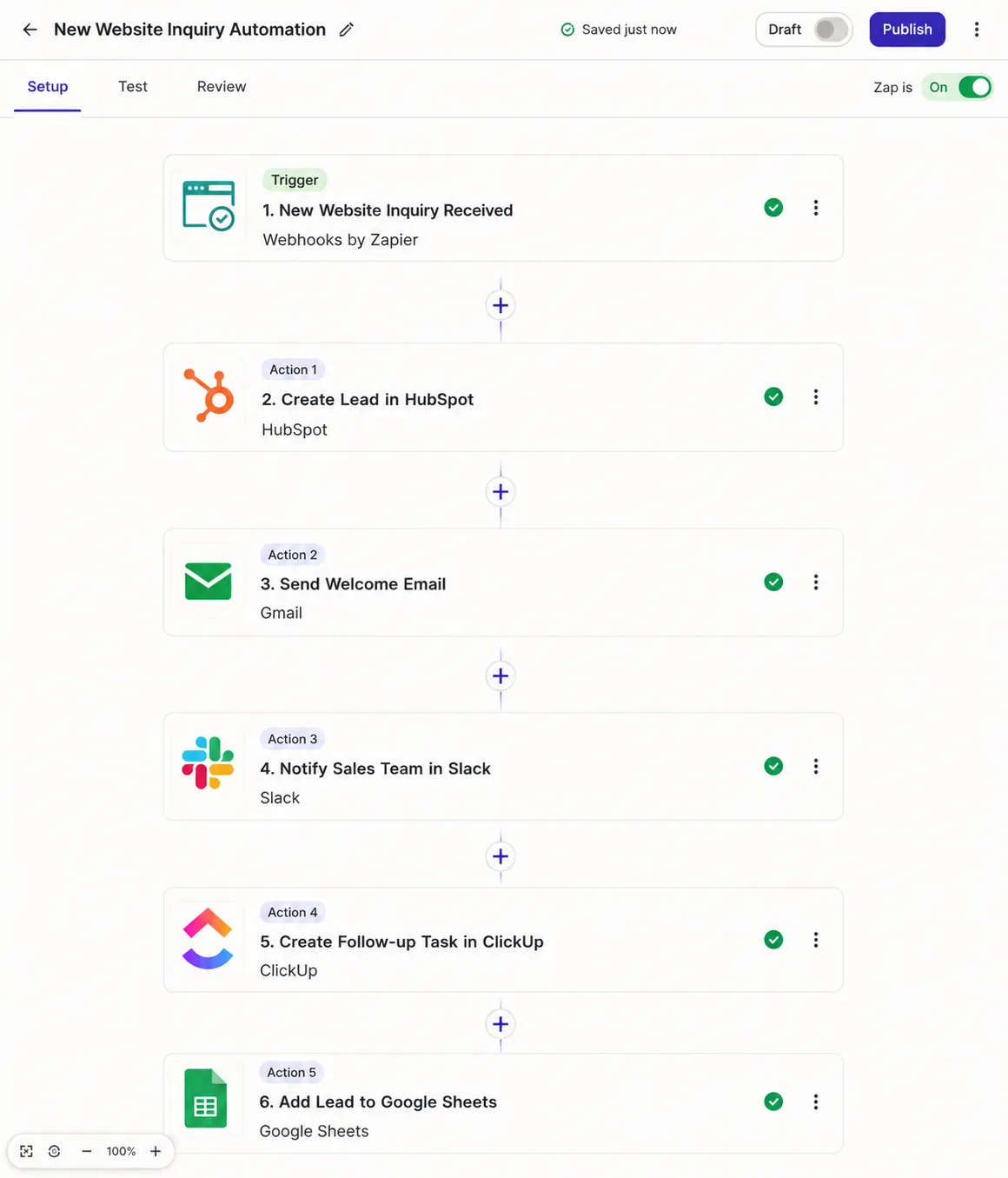
Trigger
New website inquiry received
↓
Action 1
Create lead in HubSpot
↓
Action 2
Send welcome email
↓
Action 3
Notify sales team in Slack
↓
Action 4
Create follow-up task in ClickUp
↓
Action 5
Add lead to Google Sheets
All of this happens within seconds without any manual work.
Understanding the Core Components of Zapier
Before building workflows, it's important to understand a few key terms.
Zap
A Zap is an automated workflow.
Every Zap connects one or more applications.
Example:
Gmail → Slack
Shopify → QuickBooks
Stripe → HubSpot
Trigger
The event that starts your workflow.
Example:
New customer
New order
New email
New booking
Action
The task Zapier performs after the trigger.
Examples include:
- Send message
- Create contact
- Update spreadsheet
- Add calendar event
- Generate invoice
Multi-Step Zaps
Instead of one action, Zapier allows multiple actions.
For example:
Shopify
↓
HubSpot
↓
Slack
↓
Google Sheets
↓
QuickBooks
↓
Mailchimp
One event updates every business system automatically.
Filters
Filters allow your workflow to run only under certain conditions.
Example:
Only send Slack notifications if the order value exceeds ₹10,000.
This prevents unnecessary automation.
Paths
Paths let your automation make decisions.
Example:
If customer is from India
↓
Send GST invoice
If customer is from the USA
↓
Send international invoice
This creates smart workflows based on different conditions.
Popular Apps That Integrate with Zapier
One of Zapier's biggest strengths is its massive ecosystem of integrations. It connects with thousands of apps used across sales, marketing, customer support, finance, productivity, and eCommerce.
Some of the most popular integrations include:
CRM
- HubSpot
- Salesforce
- Pipedrive
- Zoho CRM
Marketing
- Mailchimp
- Klaviyo
- ActiveCampaign
- ConvertKit
Productivity
- Google Sheets
- Google Drive
- Notion
- Trello
- ClickUp
- Asana
Communication
- Slack
- Microsoft Teams
- Gmail
- Outlook
eCommerce
- Shopify
- WooCommerce
- Stripe
- PayPal
AI Tools
- ChatGPT
- Claude
- Gemini
These integrations allow businesses to build powerful end-to-end workflows without writing code.
Real-World Zapier Use Cases
One of Zapier's biggest advantages is its flexibility. Whether you're a freelancer, startup, agency, or enterprise, you can automate repetitive tasks without writing a single line of code.
Let's look at how different industries use Zapier every day.
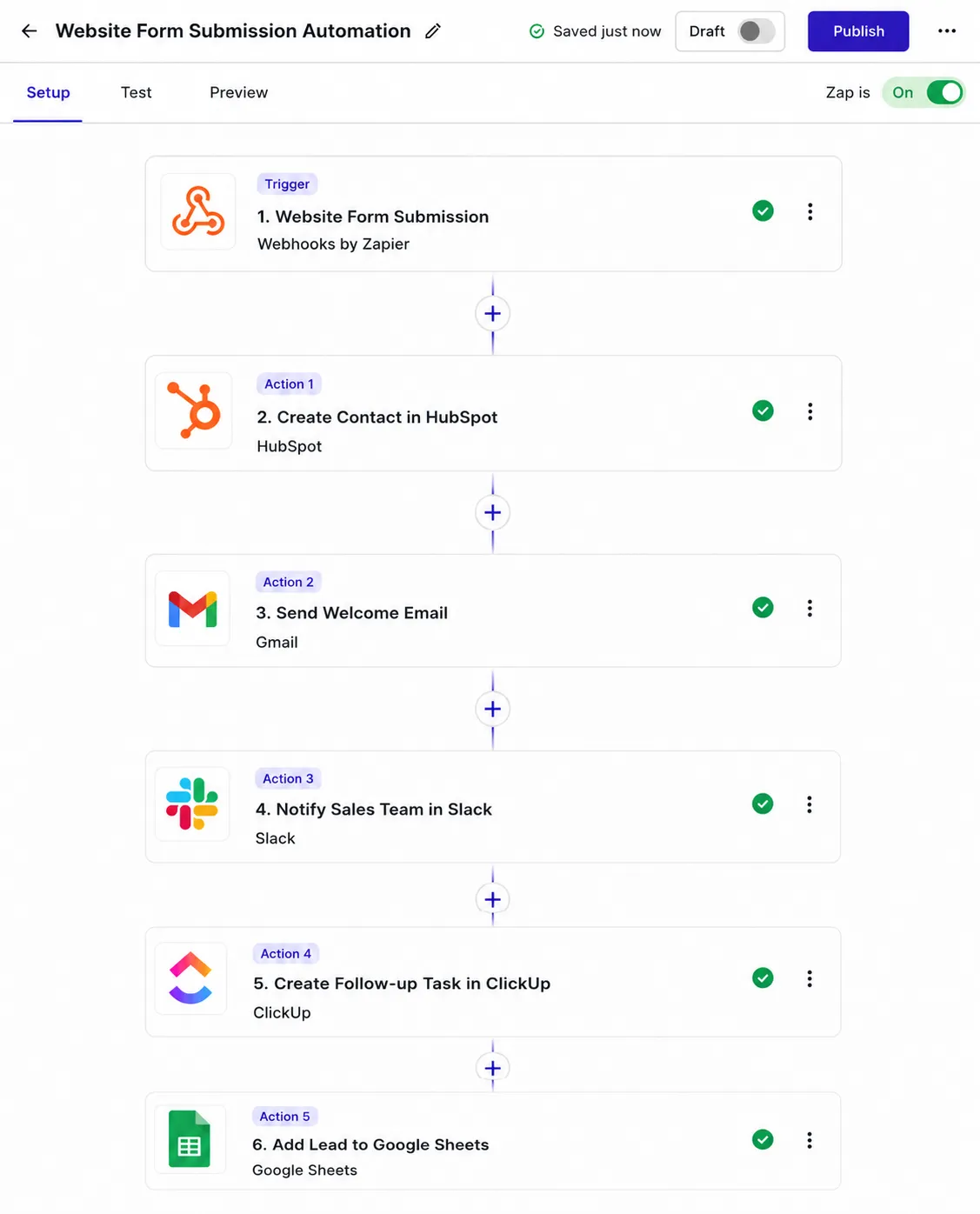
1. Lead Generation Automation
Every business wants leads—but manually copying lead information from forms into a CRM wastes valuable time.
With Zapier, every new lead is automatically processed.
Example Workflow
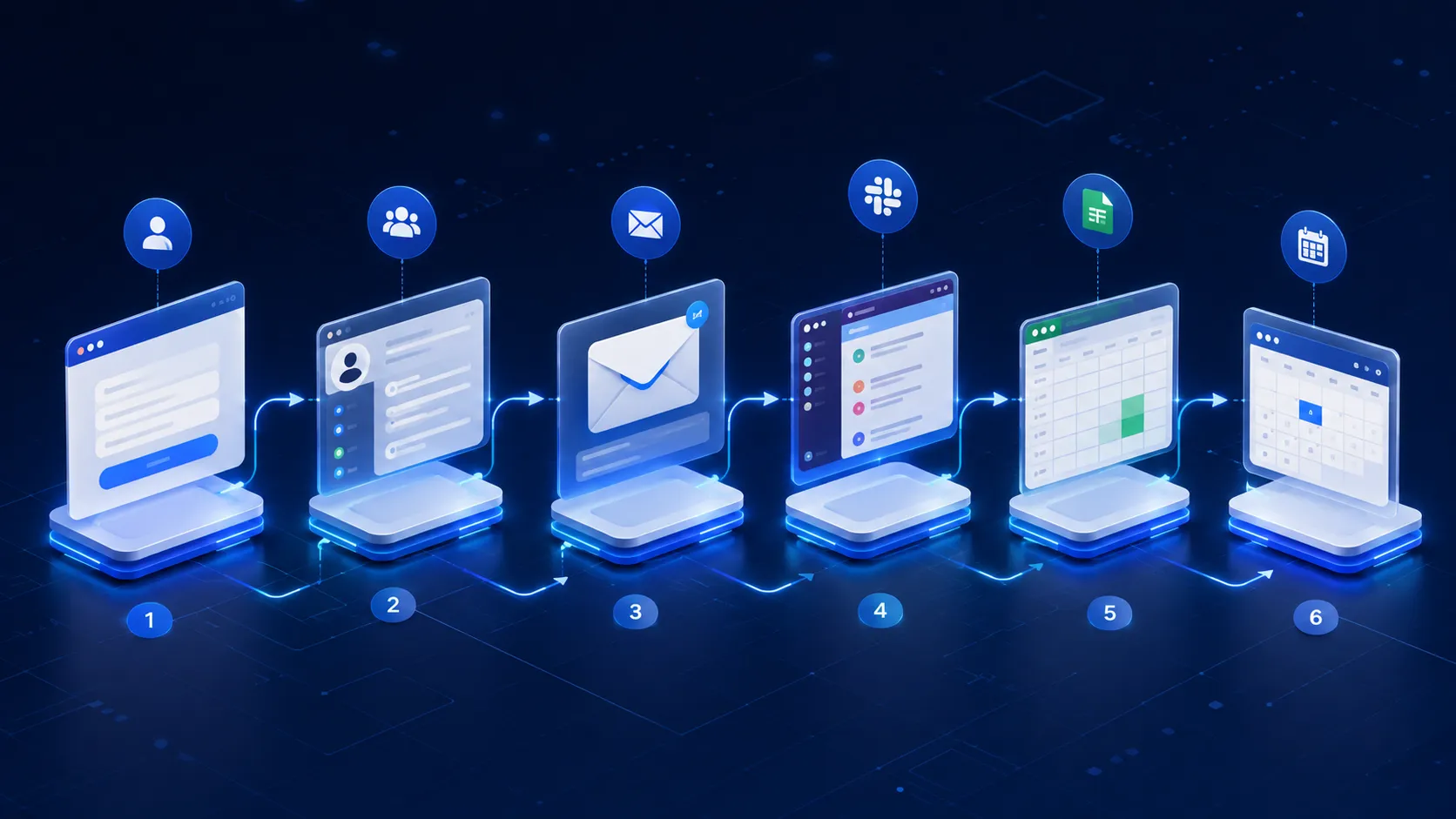
Website Form Submission
↓
Create Contact in HubSpot
↓
Send Welcome Email
↓
Notify Sales Team in Slack
↓
Create Follow-up Task in ClickUp
↓
Add Lead to Google Sheets
The result?
- Faster lead response
- No missed enquiries
- Better customer experience
- Higher conversion rates
2. E-commerce Automation
Online stores use dozens of tools to manage orders, inventory, customers, shipping, and marketing.
Zapier keeps them connected automatically.
Example Workflow
Customer Places Order on Shopify
↓
Create Invoice in QuickBooks
↓
Update Inventory
↓
Add Customer to Klaviyo
↓
Send Shipping Notification
↓
Notify Warehouse Team
Instead of managing five different systems manually, everything happens automatically.
3. Marketing Automation
Marketing teams often juggle multiple platforms.
Zapier connects them into one seamless workflow.
Example automations include:
- Facebook Lead Ads → CRM
- Google Forms → Email Marketing
- Webinar Registration → CRM
- CRM → Newsletter List
- Blog Published → Social Media Posts
This reduces manual work while improving campaign consistency.
4. Customer Support Automation
Support teams receive requests from multiple channels.
Zapier can centralize everything.
For example:
Customer Email
↓
Create Zendesk Ticket
↓
Notify Support Team
↓
Create Internal Task
↓
Send Confirmation Email
Customers receive faster responses while support teams stay organized.
5. HR & Recruitment
Recruitment involves repetitive administrative tasks.
Zapier can automate:
- New application received
- Add candidate to ATS
- Notify hiring manager
- Schedule interview
- Send confirmation email
- Update spreadsheet
Recruiters spend more time interviewing and less time on manual data entry.

Advanced Zapier Features
Zapier has evolved far beyond simple "if this, then that" automations.
Here are some powerful features available in 2026.
Multi-Step Zaps
Instead of just one action, a Zap can perform dozens of actions in sequence.
Example:
New Stripe Payment
↓
Update CRM
↓
Generate Invoice
↓
Create Project
↓
Notify Team
↓
Send Welcome Email
↓
Create Calendar Event
One event triggers your entire onboarding process.
Filters
Filters prevent unnecessary automations.
Example:
Only continue if:
- Order value exceeds ₹5,000
- Customer is a first-time buyer
- Lead source is Google Ads
This makes workflows smarter and more efficient.
Paths
Paths allow different actions based on conditions.
For example:
If customer selects Enterprise Plan
↓
Notify Sales Manager
Otherwise
↓
Send Standard Welcome Email
This creates personalized workflows without manual decisions.
AI-Powered Automation
Zapier now includes AI capabilities that can:
- Summarize emails
- Categorize support tickets
- Generate content
- Extract information from documents
- Classify customer enquiries
- Draft replies
Instead of simply moving data, Zapier can also process and enrich it using AI.

Webhooks
Not every application has a native Zapier integration.
Webhooks solve this problem by allowing custom data to be sent between systems.
Developers commonly use webhooks for:
- Custom websites
- SaaS applications
- Internal tools
- Mobile apps
- APIs
This makes Zapier suitable for advanced automation projects as well.
Zapier Pricing (2026)
Zapier offers multiple plans designed for individuals, growing businesses, and enterprises.
Free Plan
Ideal for beginners.
Includes:
- Basic automations
- Limited monthly tasks
- Single-step workflows
- Standard integrations
Great for learning the platform.
Professional Plans
Designed for businesses needing:
- Multi-step Zaps
- Premium app integrations
- AI features
- Advanced filters
- Paths
- Faster execution
- Higher task limits
As your business grows, upgrading unlocks more powerful automation capabilities.
Pros and Cons of Zapier
Advantages
✔ Easy to use without coding
✔ Thousands of integrations
✔ Reliable cloud-based platform
✔ Saves hours of manual work
✔ Reduces human error
✔ Supports AI-powered workflows
✔ Scales with business growth
✔ Excellent documentation
Limitations
✘ Advanced workflows can become expensive
✘ High task volumes increase monthly costs
✘ Complex enterprise automations may require additional tools
✘ Some integrations have API limitations
Despite these drawbacks, Zapier remains one of the most user-friendly automation platforms available.

Zapier vs Make vs n8n
Choosing the right automation platform depends on your business needs.
| Feature | Zapier | Make | n8n |
|---|---|---|---|
| Ease of Use | ⭐⭐⭐⭐⭐ | ⭐⭐⭐⭐ | ⭐⭐⭐ |
| No-Code Experience | Excellent | Excellent | Moderate |
| Advanced Logic | Good | Excellent | Excellent |
| Visual Workflow Builder | Basic | Excellent | Excellent |
| Self Hosting | No | No | Yes |
| AI Features | Excellent | Good | Excellent |
| Best For | Businesses & Agencies | Complex Automations | Developers |
Choose Zapier if:
- You want the fastest setup.
- Your team doesn't code.
- You rely on popular SaaS applications.
- Reliability and support are priorities.
Choose Make if:
You need complex visual workflows with advanced branching and data manipulation.
Choose n8n if:
You want self-hosting, greater customization, or lower long-term costs for technical teams.
Best Practices for Using Zapier
To get the most value from automation:
- Start with repetitive tasks that consume the most time.
- Use clear names for every Zap.
- Test workflows before activating them.
- Monitor task usage regularly.
- Add filters to avoid unnecessary executions.
- Document important workflows for your team.
- Review automations every few months to remove outdated processes.
These habits help keep your automation ecosystem efficient and easy to maintain.
Is Zapier Worth It in 2026?
For most businesses, the answer is yes.
If your team spends hours every week moving data between applications, automation quickly pays for itself through saved time and fewer mistakes.
Zapier is particularly valuable for:
- Marketing agencies
- eCommerce stores
- SaaS businesses
- Consultants
- Sales teams
- Customer support teams
- Small and medium-sized businesses
While larger enterprises with highly customized requirements may combine Zapier with other automation platforms, it remains one of the easiest ways to connect business applications and eliminate repetitive work.
Frequently Asked Questions (FAQ)
What is Zapier used for?
Zapier is used to automate repetitive tasks by connecting different apps and services. It helps businesses move data automatically between tools without coding.
Is Zapier free?
Yes. Zapier offers a free plan with limited tasks and basic workflows. Paid plans unlock advanced automation features, premium apps, and higher usage limits.
Do I need coding skills to use Zapier?
No. Zapier is designed for no-code users, allowing anyone to build workflows through a visual interface.
Which apps work with Zapier?
Zapier integrates with thousands of applications, including Shopify, HubSpot, Gmail, Slack, Google Sheets, Salesforce, Stripe, Notion, Mailchimp, ClickUp, and many more.
Is Zapier secure?
Zapier uses industry-standard security practices, encryption, and authentication to protect user data. Businesses should still follow best practices for API keys and account permissions.
What are Zaps?
A Zap is an automated workflow made up of a trigger (an event that starts the workflow) and one or more actions (tasks that Zapier performs automatically).
Final Thoughts
As businesses continue adopting AI and cloud-based software, the ability to connect applications seamlessly has become a competitive advantage rather than a luxury.
Zapier makes automation accessible to everyone—whether you're a solo entrepreneur looking to save time or a growing company aiming to streamline operations across sales, marketing, finance, and customer support. By replacing repetitive manual work with intelligent workflows, teams can focus on strategy, creativity, and delivering better customer experiences.
If you're just getting started, begin with one simple automation, such as sending new website leads to your CRM. As you gain confidence, you can build more advanced workflows that connect multiple apps and even incorporate AI into your business processes.
Ready to Automate Your Business?
At Jaseir Technologies, we design and implement custom automation solutions using Zapier, Make, n8n, AI, CRMs, and eCommerce platforms. Whether you want to automate lead management, streamline operations, or build intelligent AI-powered workflows, our team can help you save time and scale efficiently.
Need help building your first automation? Contact Jaseir Technologies today for a tailored automation strategy.


